
Trading Stocks and Indices on MT5
Trading stocks and indices is made much simpler with the multi-asset MetaTrader platform. Whether you focus exclusively on stocks or trade across multiple asset classes, this guide will show you how to do it using Dominion Markets on MT5.
Traders today can trade stocks as CFDs on MetaTrader, allowing them to speculate on price movements without actually owning the underlying shares. While there are many platforms available for trading stocks and indices, MT5 stands out for its intuitive design, which caters to both beginners and experienced traders. Navigating the platform is straightforward, making it easy to manage trades efficiently.
MetaTrader has designed MT5 to deliver a robust trading experience, offering a wide array of tools, indicators, and automated trading options that let traders implement virtually any strategy. This flexibility has made it one of the most popular trading platforms worldwide.
Benefits of Using MT5 for Trading Stocks and Indices
There are several reasons traders choose MT5 over other platforms:
- Fast execution speeds enable better performance, especially for scalping strategies.
- Extensive charting tools, including 38 built-in indicators, provide a comprehensive view of the markets.
- Access to 21 timeframes allows for detailed analysis of stocks and indices.
- Fundamental analysis tools, like the integrated economic calendar, help you stay updated on news and earnings.
- Multiple order types let traders place trades above or below the current market price.
These features give MT5 a significant edge over other trading platforms.
How to Start Trading Stocks and Indices on MT5
To begin trading on MT5, the first step is to create a Dominion Markets trading account. Visit the Dominion Markets website and click the Register button, which will direct you to a page where you can enter your account details and complete the setup process.
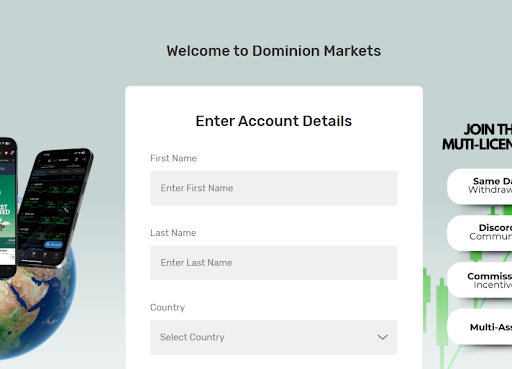
Dominion Markets Registration
Once you’ve set up your account and deposited funds, you can download the MT5 platform from the Platforms section and install it on your computer.
Start Your Trading Journey Today
Sign Up
Get high-accuracy trading signals delivered directly to your Telegram. Subscribe to specialized packages tailored for the world’s top markets:
Free Crypto Signals Subscribe via Telegram
Free Forex Signals Subscribe via Telegram
Free VIP Signals (Gold, Oil, Forex, Bitcoin, Ethereum, Indices) Subscribe via Telegram
Free Trading Acoount Open With ORON LIMITED Signals (Gold, Oil, Forex, Bitcoin, Ethereum, Indices)
Open Account
Not profitable? Don’t worry! Join our copy trading system where we provide lower risk returns. Benefits of Joining Us:
-Lesser Risk as lot size is minimal
-Higher returns (approx. 5% to 10% monthly)
-Easy Deposit and Withdrawal with USDT using crypto wallets
-Lesser Drawdown
-Instant Support
-Invest Now and get guaranteed returns with us. DM us for more info❤️
-Start Now
*Copy Trading is free but we charge some percentage of profit as fees.*
Full VIP signals performance report for September 22–26, 2025:
How to Analyse Stocks and Indices on MT5
Opening the MT5 platform provides access to a range of fundamental and technical analysis tools, which can help you make informed trading decisions based on your strategy.
Fundamental Analysis
Fundamental analysis involves examining financial statements, economic reports, political developments, and industry trends to anticipate future price movements. MT5 supports this approach with built-in tools such as the Economic Calendar, allowing you to track important news releases that could influence the stocks and indices in your portfolio.
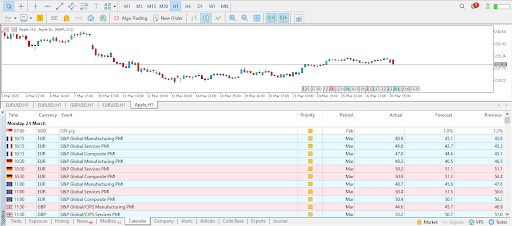
MT5 Economic Calendar
MetaTrader 5 includes a built-in economic calendar, enabling traders to track and analyze upcoming economic reports that could influence market prices. The calendar can be customized to display only the reports relevant to your trading strategy. Additionally, you can overlay major events directly on your charts to keep all upcoming releases in view.
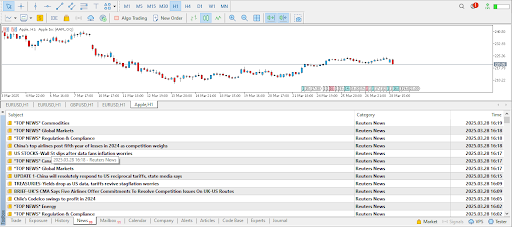
News Feature
MT5 also includes a news feature that provides updates on stocks and indices. Traders can stay informed with top news from sources like Reuters without needing to visit external websites constantly. This allows you to monitor major reports and place trades directly on the platform.
Technical Analysis
MetaTrader 5 is highly effective for technical analysis, offering a wide array of tools and indicators. The platform supports multiple chart types, including candlestick charts, which are favored by most traders. Charts can be customized by adjusting colors and creating templates to match your trading style. Many of these tools are accessible from the top toolbar or via the Insert menu.
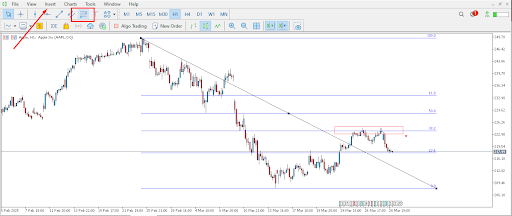
Fibonacci Tool
A basic yet powerful tool in MT5 is the Fibonacci retracement. Simply select the Fib tool and draw it on your chart to identify potential support and resistance levels. You can also use other simple tools, such as rectangles, to clearly mark these key levels for easier analysis.
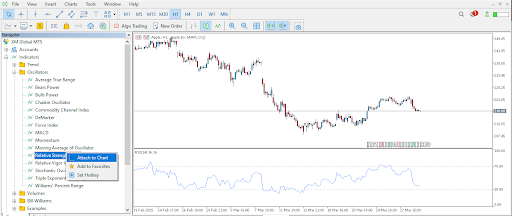
Indicators List
You can also open the Navigator to access a broader selection of advanced tools and indicators. This includes options like moving averages for trend-following strategies and the RSI to identify overbought or oversold conditions. These indicators help traders spot potential trading opportunities more effectively.
Start Your Trading Journey Today
Sign Up
Get high-accuracy trading signals delivered directly to your Telegram. Subscribe to specialized packages tailored for the world’s top markets:
Free Crypto Signals Subscribe via Telegram
Free Forex Signals Subscribe via Telegram
Free VIP Signals (Gold, Oil, Forex, Bitcoin, Ethereum, Indices) Subscribe via Telegram
Free Trading Acoount Open With ORON LIMITED Signals (Gold, Oil, Forex, Bitcoin, Ethereum, Indices)
Open Account
Not profitable? Don’t worry! Join our copy trading system where we provide lower risk returns. Benefits of Joining Us:
-Lesser Risk as lot size is minimal
-Higher returns (approx. 5% to 10% monthly)
-Easy Deposit and Withdrawal with USDT using crypto wallets
-Lesser Drawdown
-Instant Support
-Invest Now and get guaranteed returns with us. DM us for more info❤️
-Start Now
*Copy Trading is free but we charge some percentage of profit as fees.*
Full VIP signals performance report for September 22–26, 2025:
Placing Trades on MT5
Once you are familiar with MT5’s analysis tools, the next step is to place your first trade.
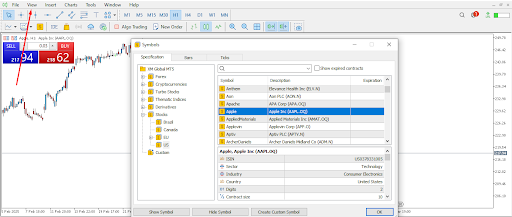
Finding Stocks on MT5
To start, locate the stock or index you want to trade. Click on the ‘View’ menu, then browse through the symbols to find your desired asset. For example, if you want to trade Apple stock, select it and click ‘Show Symbol’ to make it appear in the Market Watch window.

One-Click Trading
MT5 offers a convenient one-click trading feature that lets traders open positions with a single click, minimizing delays caused by trade confirmations.
To enable it, right-click on the chart and select the one-click trading option. You can then place your trade by either clicking ‘New Order’ or selecting a quote in the top-left corner of your chart. This will open a small window where you can enter all the necessary trade details.
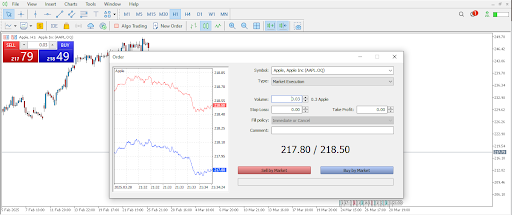
New Order Window
In the New Order window, the most critical detail to set is the volume. Choose your lot size, and decide whether to include a stop loss and take profit. If you’re in a hurry, you can add these later by right-clicking on the trade and selecting Modify. To execute the trade, click the red button to sell or the blue button to buy.
You also have the option to choose between a market order or a pending order. A market order executes immediately at the current price, while a pending order will execute later, either above or below the current price.
Tools for Managing Risk on MT5
MT5 includes built-in tools to help manage risk and protect your capital, such as stop loss and trailing stop orders. A stop-loss order closes your position if the trade moves against you. A trailing stop automatically adjusts your stop loss as your trade becomes profitable, helping you lock in gains and protect against sudden reversals.
Conclusion
Trading stocks and indices on MetaTrader has never been simpler. The platform provides both beginners and experienced traders with a full suite of technical and fundamental analysis tools.
Join Dominion Markets today to start trading stocks and indices on MT5. Benefit from a fully licensed, top-rated broker and access one of the most widely used trading platforms in the world.
Start Your Trading Journey Today
Get high-accuracy trading signals delivered directly to your Telegram. Subscribe to specialized packages tailored for the world’s top markets:
Free Crypto Signals Subscribe via Telegram
Free Forex Signals Subscribe via Telegram
Free VIP Signals (Gold, Oil, Forex, Bitcoin, Ethereum, Indices) Subscribe via Telegram
Free Trading Acoount Open With ORON LIMITED Signals (Gold, Oil, Forex, Bitcoin, Ethereum, Indices)
Open Account
Not profitable? Don’t worry! Join our copy trading system where we provide lower risk returns. Benefits of Joining Us:
-Lesser Risk as lot size is minimal
-Higher returns (approx. 5% to 10% monthly)
-Easy Deposit and Withdrawal with USDT using crypto wallets
-Lesser Drawdown
-Instant Support
-Invest Now and get guaranteed returns with us. DM us for more info❤️
-Start Now
*Copy Trading is free but we charge some percentage of profit as fees.*
Full VIP signals performance report for September 22–26, 2025:
