
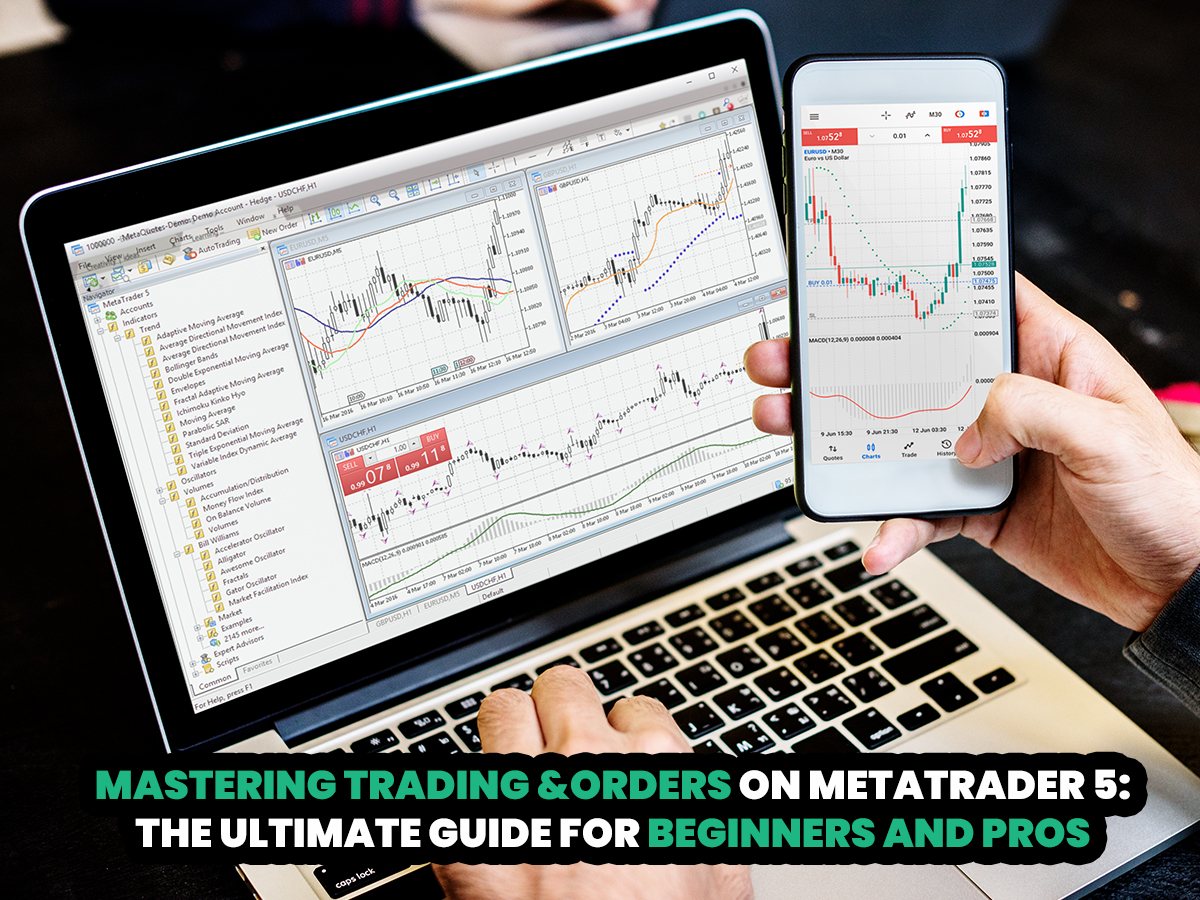
MetaTrader 5 is a modern, award-winning multi-asset platform designed for both beginners and experienced traders. Building on the popular MetaTrader 4, MT5 offers enhanced features and has become a favorite among traders worldwide. Dominion Markets provides its clients with access to MT5 for a seamless trading experience. This article explores trading and order execution on MetaTrader 5 in detail.
When starting on this platform, the first and most essential step is understanding how to place orders. Proper order placement is key to executing trades effectively, managing risk, and applying your strategy—ultimately shaping your success as a trader.
Getting Started with MT5
Installing MT5
Start Your Trading Journey Today
Signup
Get high-accuracy trading signals delivered directly to your Telegram. Subscribe to specialized packages tailored for the world’s top markets:
Free Crypto Signals Subscribe via Telegram
Free Forex Signals Subscribe via Telegram
Free VIP Signals (Gold, Oil, Forex, Bitcoin, Ethereum, Indices) Subscribe via Telegram
Free Trading Acoount Open With ORON LIMITED Signals (Gold, Oil, Forex, Bitcoin, Ethereum, Indices)
Open Account
Not profitable? Don’t worry! Join our copy trading system where we provide lower risk returns. Benefits of Joining Us:
-Lesser Risk as lot size is minimal
-Higher returns (approx. 5% to 10% monthly)
-Easy Deposit and Withdrawal with USDT using crypto wallets
-Lesser Drawdown
-Instant Support
-Invest Now and get guaranteed returns with us. DM us for more info❤️
-Start Now
*Copy Trading is free but we charge some percentage of profit as fees.*
Full VIP signals performance report for September 22–26, 2025:
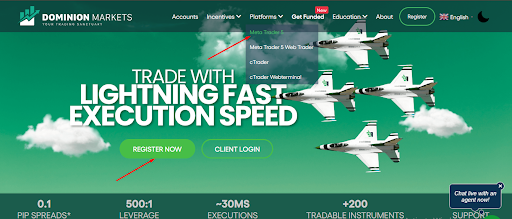
The first step is to set up the MT5 platform on your desktop. Visit the Dominion Markets website and click on “Register.” After completing your account details, you’ll receive your MT5 login credentials. Next, navigate to the “Platforms” section and select MetaTrader 5. Download the installer and run it on your computer to install the MT5 platform.
Overview of Order Types
MetaTrader 5 offers several order types, including market orders, pending orders, stop orders, and trailing stop orders.
MT5 Order Types
Market Order
A market order is the most frequently used order type by traders. It executes a trade immediately at the current market price, making it ideal when you’ve identified a solid trading opportunity and want to enter the market right away. Market orders are particularly useful for traders who monitor charts closely and act once all conditions of their strategy are met.
Pending Order
A pending order is used to anticipate future price movements, allowing you to place an order above or below the current market price. MT5 offers several types of pending orders:
- Buy Limit: A buy order placed below the current price. It triggers a long position if the price continues to drop, useful for traders expecting a bullish reversal.
- Buy Stop: A buy order placed above the current price. It triggers a long position if the price rises further, ideal for trading bullish continuation patterns.
- Sell Limit: A sell order placed above the current price, suitable for traders expecting a bearish reversal.
- Sell Stop: A sell order placed below the current price, useful for trading bearish continuation patterns.
Stop Order
A stop order is primarily a risk management tool that helps limit losses or protect profits. For example, if you are in a long position, placing a Sell Stop (stop loss) below the current price will automatically close your trade if the market moves against you, securing a controlled loss or preserving gains.
Trailing Stop Order
A trailing stop order automatically adjusts your stop level as the market moves in your favor. This allows you to lock in profits while giving your trade room to grow, making it an effective tool for maximizing winning positions.
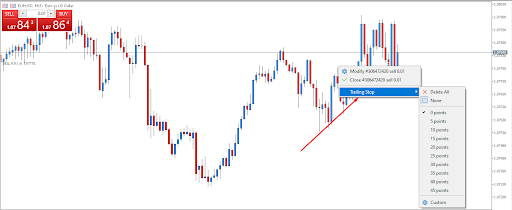
Trailing Stop Loss
A trailing stop order automatically moves with the market when your trade is in profit. This helps protect your gains by securing profits if the price suddenly reverses.
How to Enter, Modify, and Exit Trades
Once you understand the different order types on MT5, the next step is placing trades.
Entering Trades
You can open a trade directly on the chart you are analyzing or from the tools window above the chart.
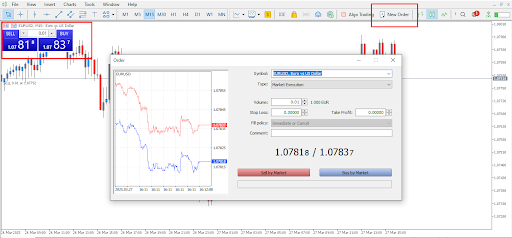
Entering Trades
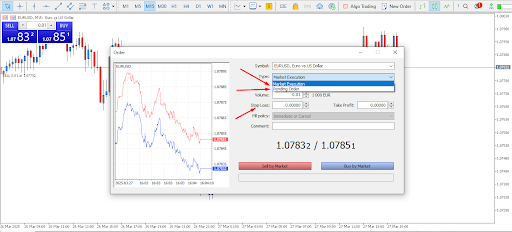
After selecting either option, a small window will appear where you can enter the details of your trade. The first section displays the symbol you are trading, which you can change if you wish to trade a different instrument.
Next, choose the type of order: a market order executes immediately at the current price, while a pending order is set to execute later, either above or below the current price.

Pending Order
Next, set the size of your position by selecting the volume, which is measured in lots and determines the trade’s scale. You can also specify a stop loss and take profit price, or, if unsure, set them manually on the chart after opening the trade. The comment field is optional, but you may add a note if desired. For a pending order, you can also set an expiration date, after which the order will be automatically canceled. Once all the details are filled in, you can place the order.
Modifying
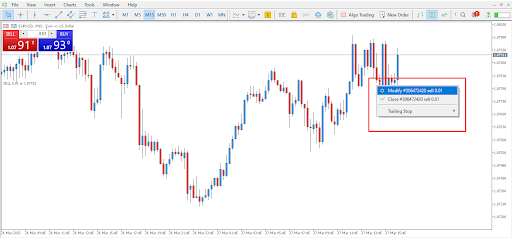
Modifying/Closing Orders
Once a trade is open, you can modify it either directly on the chart or via the trade window below the charts. Simply right-click on the trade and select “Modify” to adjust or add a stop loss and take profit.
Get high-accuracy trading signals delivered directly to your Telegram. Subscribe to specialized packages tailored for the world’s top markets:
Free Crypto Signals Subscribe via Telegram
Free Forex Signals Subscribe via Telegram
Free VIP Signals (Gold, Oil, Forex, Bitcoin, Ethereum, Indices) Subscribe via Telegram
Free Trading Acoount Open With ORON LIMITED Signals (Gold, Oil, Forex, Bitcoin, Ethereum, Indices)
Open Account
Not profitable? Don’t worry! Join our copy trading system where we provide lower risk returns. Benefits of Joining Us:
-Lesser Risk as lot size is minimal
-Higher returns (approx. 5% to 10% monthly)
-Easy Deposit and Withdrawal with USDT using crypto wallets
-Lesser Drawdown
-Instant Support
-Invest Now and get guaranteed returns with us. DM us for more info❤️
-Start Now
*Copy Trading is free but we charge some percentage of profit as fees.*
Full VIP signals performance report for September 22–26, 2025:
Exiting Trades
To close a trade, use the same method. Right-click on the trade and select “Close,” or click the “x” in the trade window to exit the position.
Advanced Features
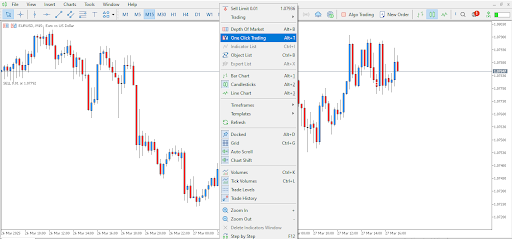
One-Click Trading and Advanced Features
MT5 offers several advanced features to enhance your trading experience, including one-click trading and hedging. One-click trading is ideal for short-term traders because it allows you to place trades instantly with a single click, eliminating the need for order confirmations. To enable this feature, simply right-click on the chart.
Hedging is another powerful tool on MetaTrader 5, allowing traders to open two opposing trades to help reduce potential losses. Additionally, you can leverage Expert Advisors (EAs), which are automated trading robots that can manage trades and implement strategies on your behalf.
How to Succeed on MT5
Mastering order placement is just the start of becoming a successful trader. Other essential factors include developing and sticking to a profitable strategy, testing it in a demo account, and using effective risk management techniques to protect your capital.
Testing your strategy in a demo account first helps build confidence and discipline before trading with real money. MT5 provides essential risk management tools like stop-loss and trailing stop orders, helping safeguard your profits and minimize losses during volatile market conditions.
Continuous learning is also crucial. Staying informed about market trends and trading techniques ensures you remain competitive. Dominion Markets offers a wide range of educational resources to help you stay updated.
Join Dominion Markets today and explore trading on MetaTrader 5, the award-winning multi-asset platform used by traders worldwide.
Start Your Trading Journey Today
Get high-accuracy trading signals delivered directly to your Telegram. Subscribe to specialized packages tailored for the world’s top markets:
Free Crypto Signals Subscribe via Telegram
Free Forex Signals Subscribe via Telegram
Free VIP Signals (Gold, Oil, Forex, Bitcoin, Ethereum, Indices) Subscribe via Telegram
Free Trading Acoount Open With ORON LIMITED Signals (Gold, Oil, Forex, Bitcoin, Ethereum, Indices)
Open Account
Not profitable? Don’t worry! Join our copy trading system where we provide lower risk returns. Benefits of Joining Us:
-Lesser Risk as lot size is minimal
-Higher returns (approx. 5% to 10% monthly)
-Easy Deposit and Withdrawal with USDT using crypto wallets
-Lesser Drawdown
-Instant Support
-Invest Now and get guaranteed returns with us. DM us for more info❤️
-Start Now
*Copy Trading is free but we charge some percentage of profit as fees.*
Full VIP signals performance report for September 22–26, 2025:
